
Speech to Text Chrome ExtensionStop typing.Just speak.
Real-time voice typing for Google Docs, Gmail, ChatGPT, and every website.
Turn your voice to text instantly – write as fast as you speak.
Works wherever you already write
Your brain is faster than your keyboard
You already know what you want to write. Don't let the keyboard slow you down – type faster with your voice.
'%3e%3cpath%20d='M9.09091%20100H30.303V48.4848L0%2025.7576V90.9091C0%2095.9394%204.07576%20100%209.09091%20100Z'%20fill='%234285F4'/%3e%3cpath%20d='M103.03%20100H124.242C129.273%20100%20133.333%2095.9242%20133.333%2090.9091V25.7576L103.03%2048.4848'%20fill='%2334A853'/%3e%3cpath%20d='M103.03%209.09091V48.4848L133.333%2025.7576V13.6364C133.333%202.39394%20120.5%20-4.01515%20111.515%202.72727'%20fill='%23FBBC04'/%3e%3cpath%20d='M30.303%2048.4848V9.09091L66.6667%2036.3636L103.03%209.09091V48.4848L66.6667%2075.7576'%20fill='%23EA4335'/%3e%3cpath%20d='M0%2013.6364V25.7576L30.303%2048.4848V9.09091L21.8182%202.72727C12.8182%20-4.01515%200%202.39394%200%2013.6364'%20fill='%23C5221F'/%3e%3c/g%3e%3cdefs%3e%3cclipPath%20id='clip0_1:194'%3e%3crect%20width='133.333'%20height='100'%20fill='white'/%3e%3c/clipPath%3e%3c/defs%3e%3c/svg%3e) GmailGmail
GmailGmail
A typical 6-minute email. Dictated in 30 seconds.
Spend less time typing.
More time thinking
Small typing tasks quietly become hours every week. Just talk to type and get that time back.
'%20transform='matrix(6.2502276,0,0,6.2502276,-200.00728,-50.001821)'%3e%3cpath%20d='M159.94%20184H31.9999V8h68l59.9991%2060z'%20fill='%233186ff'/%3e%3cg%20filter='url(%23b)'%3e%3cpath%20d='M43%20192h106V20H43Z'%20fill='url(%23c)'/%3e%3c/g%3e%3c/g%3e%3cpath%20d='M768.7468%20343.7319c-15.6631-11.7554-35.1263-18.72-56.2208-18.72H505.0183c-44.1829%200-80.003-35.8189-80.003-80.0017V0Z'%20fill='%2376bbff'/%3e%3crect%20x='200.0135'%20y='662.5241'%20width='400.0146'%20height='75.0027'%20rx='37.5014'%20fill='%23ffffff'/%3e%3crect%20x='200.0135'%20y='843.7807'%20width='300.0109'%20height='75.0027'%20rx='37.5014'%20fill='%23ffffff'/%3e%3cdefs%3e%3clinearGradient%20id='c'%20x1='96'%20y1='59.2839'%20x2='54.6124'%20y2='171.338'%20gradientUnits='userSpaceOnUse'%3e%3cstop%20offset='.33'%20stop-color='%233186FF'/%3e%3cstop%20offset='1'%20stop-color='%23A9A8FF'/%3e%3c/linearGradient%3e%3cfilter%20id='b'%20x='31'%20y='8'%20width='130'%20height='196'%20filterUnits='userSpaceOnUse'%20color-interpolation-filters='sRGB'%3e%3cfeFlood%20flood-opacity='0'%20result='BackgroundImageFix'/%3e%3cfeBlend%20mode='normal'%20in='SourceGraphic'%20in2='BackgroundImageFix'%20result='shape'/%3e%3cfeGaussianBlur%20stdDeviation='6'%20result='effect1_foregroundBlur_37242_8762'/%3e%3c/filter%3e%3c/defs%3e%3c/svg%3e)

%20--%3e%3c!DOCTYPE%20svg%20PUBLIC%20'-//W3C//DTD%20SVG%201.1//EN'%20'http://www.w3.org/Graphics/SVG/1.1/DTD/svg11.dtd'%20[%20%3c!ENTITY%20ns_extend%20'http://ns.adobe.com/Extensibility/1.0/'%3e%3c!ENTITY%20ns_ai%20'http://ns.adobe.com/AdobeIllustrator/10.0/'%3e%3c!ENTITY%20ns_graphs%20'http://ns.adobe.com/Graphs/1.0/'%3e%3c!ENTITY%20ns_vars%20'http://ns.adobe.com/Variables/1.0/'%3e%3c!ENTITY%20ns_imrep%20'http://ns.adobe.com/ImageReplacement/1.0/'%3e%3c!ENTITY%20ns_sfw%20'http://ns.adobe.com/SaveForWeb/1.0/'%3e%3c!ENTITY%20ns_custom%20'http://ns.adobe.com/GenericCustomNamespace/1.0/'%3e%3c!ENTITY%20ns_adobe_xpath%20'http://ns.adobe.com/XPath/1.0/'%3e%20]%3e%3csvg%20version='1.1'%20id='Livello_1'%20xmlns:x='&ns_extend;'%20xmlns:i='&ns_ai;'%20xmlns:graph='&ns_graphs;'%20xmlns='http://www.w3.org/2000/svg'%20xmlns:xlink='http://www.w3.org/1999/xlink'%20x='0px'%20y='0px'%20viewBox='0%200%201881.25%201750'%20enable-background='new%200%200%201881.25%201750'%20xml:space='preserve'%3e%3cmetadata%3e%3csfw%20xmlns='&ns_sfw;'%3e%3cslices%3e%3c/slices%3e%3csliceSourceBounds%20bottomLeftOrigin='true'%20height='1750'%20width='1881.25'%20x='-938.5'%20y='-851'%3e%3c/sliceSourceBounds%3e%3c/sfw%3e%3c/metadata%3e%3cpath%20fill='%2341A5EE'%20d='M1801.056,0H517.694C473.404,0,437.5,35.904,437.5,80.194c0,0,0,0,0,0V437.5l743.75,218.75l700-218.75%20V80.194C1881.25,35.904,1845.346,0,1801.056,0L1801.056,0z'/%3e%3cpath%20fill='%232B7CD3'%20d='M1881.25,437.5H437.5V875l743.75,131.25l700-131.25V437.5z'/%3e%3cpath%20fill='%23185ABD'%20d='M437.5,875v437.5l700,87.5l743.75-87.5V875H437.5z'/%3e%3cpath%20fill='%23103F91'%20d='M517.694,1750h1283.363c44.29,0,80.194-35.904,80.194-80.194l0,0V1312.5H437.5v357.306%20C437.5,1714.096,473.404,1750,517.694,1750L517.694,1750z'/%3e%3cpath%20opacity='0.1'%20enable-background='new%20'%20d='M969.806,350H437.5v1093.75h532.306c44.23-0.144,80.05-35.964,80.194-80.194%20V430.194C1049.856,385.964,1014.036,350.144,969.806,350z'/%3e%3cpath%20opacity='0.2'%20enable-background='new%20'%20d='M926.056,393.75H437.5V1487.5h488.556c44.23-0.144,80.05-35.964,80.194-80.194%20V473.944C1006.106,429.714,970.286,393.894,926.056,393.75z'/%3e%3cpath%20opacity='0.2'%20enable-background='new%20'%20d='M926.056,393.75H437.5V1400h488.556c44.23-0.144,80.05-35.964,80.194-80.194%20V473.944C1006.106,429.714,970.286,393.894,926.056,393.75z'/%3e%3cpath%20opacity='0.2'%20enable-background='new%20'%20d='M882.306,393.75H437.5V1400h444.806c44.23-0.144,80.05-35.964,80.194-80.194%20V473.944C962.356,429.714,926.536,393.894,882.306,393.75z'/%3e%3clinearGradient%20id='SVGID_1_'%20gradientUnits='userSpaceOnUse'%20x1='167.2057'%20y1='1420.9117'%20x2='795.2943'%20y2='333.0883'%20gradientTransform='matrix(1%200%200%20-1%200%201752)'%3e%3cstop%20offset='0'%20style='stop-color:%232368C4'/%3e%3cstop%20offset='0.5'%20style='stop-color:%231A5DBE'/%3e%3cstop%20offset='1'%20style='stop-color:%231146AC'/%3e%3c/linearGradient%3e%3cpath%20fill='url(%23SVGID_1_)'%20d='M80.194,393.75h802.112c44.29,0,80.194,35.904,80.194,80.194v802.113%20c0,44.29-35.904,80.194-80.194,80.194H80.194c-44.29,0-80.194-35.904-80.194-80.194V473.944C0,429.654,35.904,393.75,80.194,393.75z%20'/%3e%3cpath%20fill='%23FFFFFF'%20d='M329.088,1008.788c1.575,12.381,2.625,23.144,3.106,32.375h1.837c0.7-8.75,2.158-19.294,4.375-31.631%20c2.217-12.338,4.215-22.765,5.994-31.281l84.35-363.913h109.069l87.5,358.444c5.084,22.288,8.723,44.881,10.894,67.637h1.444%20c1.631-22.047,4.671-43.966,9.1-65.625l69.781-360.631h99.269l-122.588,521.5H577.238L494.113,790.3%20c-2.406-9.931-5.162-22.925-8.181-38.894c-3.019-15.969-4.9-27.65-5.644-35h-1.444c-0.962,8.487-2.844,21.088-5.644,37.8%20c-2.8,16.713-5.046,29.079-6.738,37.1l-78.138,344.269h-117.95L147.131,614.337h101.062l75.994,364.656%20C325.894,986.475,327.513,996.45,329.088,1008.788z'/%3e%3c/svg%3e)
Create documents effortlessly
Skip the blank page. Use voice typing in Google Docs to draft reports, proposals, and essays in minutes instead of hours.
Long writing made easy

%20--%3e%3csvg%20xmlns='http://www.w3.org/2000/svg'%20xmlns:xlink='http://www.w3.org/1999/xlink'%20viewBox='0%200%2048%2048'%20width='48px'%20height='48px'%3e%3cpath%20style='fill:%23FFFFFF;'%20d='M4.868,43.303l2.694-9.835C5.9,30.59,5.026,27.324,5.027,23.979C5.032,13.514,13.548,5,24.014,5c5.079,0.002,9.845,1.979,13.43,5.566c3.584,3.588,5.558,8.356,5.556,13.428c-0.004,10.465-8.522,18.98-18.986,18.98c-0.001,0,0,0,0,0h-0.008c-3.177-0.001-6.3-0.798-9.073-2.311L4.868,43.303z'/%3e%3cg%20%3e%3cpath%20style='fill:%23FFFFFF;'%20d='M4.868,43.803c-0.132,0-0.26-0.052-0.355-0.148c-0.125-0.127-0.174-0.312-0.127-0.483l2.639-9.636c-1.636-2.906-2.499-6.206-2.497-9.556C4.532,13.238,13.273,4.5,24.014,4.5c5.21,0.002,10.105,2.031,13.784,5.713c3.679,3.683,5.704,8.577,5.702,13.781c-0.004,10.741-8.746,19.48-19.486,19.48c-3.189-0.001-6.344-0.788-9.144-2.277l-9.875,2.589C4.953,43.798,4.911,43.803,4.868,43.803z'/%3e%3cpath%20style='fill:%23CFD8DC;'%20d='M24.014,5c5.079,0.002,9.845,1.979,13.43,5.566c3.584,3.588,5.558,8.356,5.556,13.428c-0.004,10.465-8.522,18.98-18.986,18.98h-0.008c-3.177-0.001-6.3-0.798-9.073-2.311L4.868,43.303l2.694-9.835C5.9,30.59,5.026,27.324,5.027,23.979C5.032,13.514,13.548,5,24.014,5%20M24.014,42.974C24.014,42.974,24.014,42.974,24.014,42.974C24.014,42.974,24.014,42.974,24.014,42.974%20M24.014,42.974C24.014,42.974,24.014,42.974,24.014,42.974C24.014,42.974,24.014,42.974,24.014,42.974%20M24.014,4C24.014,4,24.014,4,24.014,4C12.998,4,4.032,12.962,4.027,23.979c-0.001,3.367,0.849,6.685,2.461,9.622l-2.585,9.439c-0.094,0.345,0.002,0.713,0.254,0.967c0.19,0.192,0.447,0.297,0.711,0.297c0.085,0,0.17-0.011,0.254-0.033l9.687-2.54c2.828,1.468,5.998,2.243,9.197,2.244c11.024,0,19.99-8.963,19.995-19.98c0.002-5.339-2.075-10.359-5.848-14.135C34.378,6.083,29.357,4.002,24.014,4L24.014,4z'/%3e%3c/g%3e%3cpath%20style='fill:%2340C351;'%20d='M35.176,12.832c-2.98-2.982-6.941-4.625-11.157-4.626c-8.704,0-15.783,7.076-15.787,15.774c-0.001,2.981,0.833,5.883,2.413,8.396l0.376,0.597l-1.595,5.821l5.973-1.566l0.577,0.342c2.422,1.438,5.2,2.198,8.032,2.199h0.006c8.698,0,15.777-7.077,15.78-15.776C39.795,19.778,38.156,15.814,35.176,12.832z'/%3e%3cpath%20style='fill-rule:evenodd;clip-rule:evenodd;fill:%23FFFFFF;'%20d='M19.268,16.045c-0.355-0.79-0.729-0.806-1.068-0.82c-0.277-0.012-0.593-0.011-0.909-0.011c-0.316,0-0.83,0.119-1.265,0.594c-0.435,0.475-1.661,1.622-1.661,3.956c0,2.334,1.7,4.59,1.937,4.906c0.237,0.316,3.282,5.259,8.104,7.161c4.007,1.58,4.823,1.266,5.693,1.187c0.87-0.079,2.807-1.147,3.202-2.255c0.395-1.108,0.395-2.057,0.277-2.255c-0.119-0.198-0.435-0.316-0.909-0.554s-2.807-1.385-3.242-1.543c-0.435-0.158-0.751-0.237-1.068,0.238c-0.316,0.474-1.225,1.543-1.502,1.859c-0.277,0.317-0.554,0.357-1.028,0.119c-0.474-0.238-2.002-0.738-3.815-2.354c-1.41-1.257-2.362-2.81-2.639-3.285c-0.277-0.474-0.03-0.731,0.208-0.968c0.213-0.213,0.474-0.554,0.712-0.831c0.237-0.277,0.316-0.475,0.474-0.791c0.158-0.317,0.079-0.594-0.04-0.831C20.612,19.329,19.69,16.983,19.268,16.045z'/%3e%3c/svg%3e)
Reply to emails in minutes
That email you've been putting off for days? Just say what you want to write and move on. Stop turning every email into another task.
Clear your inbox faster


Talk to AI naturally
Stop rewriting prompts over and over. Explain what you need the way you'd explain it to another person. Let your thoughts flow naturally.
Focus on ideas, not prompts
Never lose a good idea
Great ideas rarely come at the right moment. Capture them by speaking before the next task pushes them away.
Keep less on your mind
Write fluently, not carefully
Stop slowing down to fix grammar. Voice typing with punctuation makes your writing polished and ready to use.
Write confidently in any language
Keep working hands-free
Write without stopping what you're doing. Perfect when your hands are busy or your thoughts move faster than your keyboard.
Stay in the flow
Trusted by people who write for a living

Keep your thoughts flowing from idea to finished draft without stopping to type

Clear your communication backlog faster – from emails to reports and client replies

Capture more insights and findings as they come without breaking your focus to type

Get better results by giving AI the full context behind your thinking – without typing it all out
No more typing long texts. Just say what you want to write.
Designed to stay out of your way
Publish-ready text in seconds
Turn voice to text with formatting, punctuation, and small corrections. No need to say "comma" or "period."
No waiting
Your words appear as you speak – not after you finish. Just keep talking.
Switch languages naturally
50+ languages. Speak English. Switch to Spanish. Even mix both in one sentence. No settings. No restart.
Accurate and reliable
Speak the way you normally do. Understands accents, fast speech, and real conversations.
Private by design
Only listens when you click the microphone. Never listens in the background. Turn it off anytime.
Works everywhere
One voice to text extension for every text field. Reliable voice dictation in Chrome across thousands of websites.
Join 1,000+ people already
writing with voice
"I used to lose ideas before I could type them. Now I can create notes really quickly, and I don't have to keep everything in my head."
"It understands my accent surprisingly well. I don't have to slow down. I speak normally and barely edit anything."
"Emails take me half the time now. I just say what I want to write instead of overthinking every sentence."
"I used to lose ideas before I could type them. Now I can create notes really quickly, and I don't have to keep everything in my head."
"It understands my accent surprisingly well. I don't have to slow down. I speak normally and barely edit anything."
"Emails take me half the time now. I just say what I want to write instead of overthinking every sentence."
"I used to lose ideas before I could type them. Now I can create notes really quickly, and I don't have to keep everything in my head."
"It understands my accent surprisingly well. I don't have to slow down. I speak normally and barely edit anything."
"Emails take me half the time now. I just say what I want to write instead of overthinking every sentence."
"I used to lose ideas before I could type them. Now I can create notes really quickly, and I don't have to keep everything in my head."
"It understands my accent surprisingly well. I don't have to slow down. I speak normally and barely edit anything."
"Emails take me half the time now. I just say what I want to write instead of overthinking every sentence."
"The language detection works really well. It handles multilingual speech much better than expected."
"Really useful for writing long emails and messages. I can just speak naturally and it turns it into clean text."
"Good to use. Thank you."
"The language detection works really well. It handles multilingual speech much better than expected."
"Really useful for writing long emails and messages. I can just speak naturally and it turns it into clean text."
"Good to use. Thank you."
"The language detection works really well. It handles multilingual speech much better than expected."
"Really useful for writing long emails and messages. I can just speak naturally and it turns it into clean text."
"Good to use. Thank you."
"The language detection works really well. It handles multilingual speech much better than expected."
"Really useful for writing long emails and messages. I can just speak naturally and it turns it into clean text."
"Good to use. Thank you."
Ready in under a minute
Add to Chrome
Install the speech to text extension in one click.
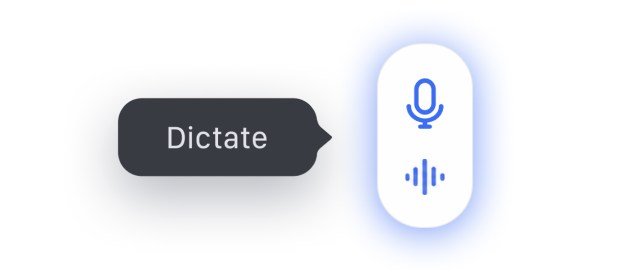
Click the mic
A microphone appears everywhere you write.
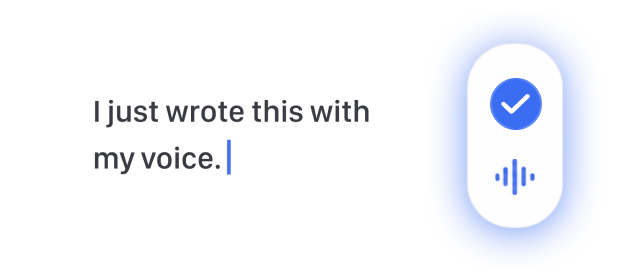
Speak naturally
Your thoughts become text instantly.
Frequently asked questions
Is the microphone always on?+
No. It only starts listening after you click the microphone button and stops as soon as you finish recording. There are no background recordings, and you can disable it at any time. Our speech recognition software is designed to listen only when you choose, making speech typing secure and private.
How to voice type on Google Docs?+
Install our dictation software in one click, open your document, and click the microphone. Start speaking, and your words will appear as you speak.
Does it work with ChatGPT, Claude and Gemini?+
Yes. Speak to Type functions as an ai voice typing extension, allowing you to dictate prompts directly into ChatGPT, Claude, and Gemini text fields. Easily use our speech to text online tool for every AI chat.
Does it support long writing in Google Docs?+
Yes. Click the microphone in any document and start thinking out loud. Watch your ideas fill the blank page in seconds. It delivers fast voice to text in Google Docs with automatic punctuation and capitalization.
Can I use it to compose emails?+
Yes. It lets you dictate Gmail and Outlook messages naturally and reply to emails faster. You can use it as a dictation for Gmail Chrome extension. Email appears in the compose window as you speak.
Is it suitable for any website?+
Yes, our voice to text chrome extension works across thousands of websites. Just click the microphone where you already write – your thoughts turn into written content instantly.
Does it work in my language?+
Yes. It supports 50+ languages, including English, Spanish, Portuguese, French, Japanese, Chinese, and more. For the best accuracy, select the specific language you're speaking at that moment rather than relying on auto-detect.
Do I need an account?+
No account required. No setup needed. It's a dictation app that's ready to use in seconds. Just install it in one click.
Is it free?+
Yes. You can use Speak to Type for 3,600 seconds of free dictation every month, with no account or credit card required. If you dictate often and need more, request Early Access – we're happy to offer unlimited voice typing to early users.
Write at the
speed of thought
Smart voice typing in browser turns your voice into text in seconds.